







07-17-2025, 06:14 PM
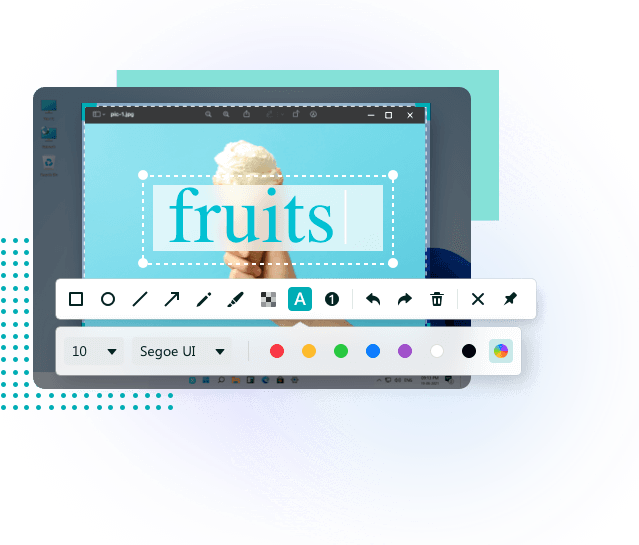
EaseUS ScreenShot 1.1 | Size: 133.4 MB
Language: English
Capture anything on your desktop with ease through this tool, which grants users a robust screenshotting toolkit to cover all of their needs.
Handy tool for screenshots
This one comes free-of-charge, so users will be able to enjoy the full extent of its functions without a worry. The app is easy to get started with and utilized, and it does just what you would expect: it helps you capture your screen with little effort.
You can capture the entire screen, or just a region of it. To help with usability, double-pressing the Alt key will automatically engage full screen capture, while pressing Ctrl twice will allow you to select a region of your choosing. The hotkeys are easy to remember and trigger, and they shouldn't really conflict with anything else.
Annotate your captures
While capturing something, users are granted the ability to annotate their screenshots in various ways. You can doodle over your captures, add text, draw shapes, and even blur out sensitive data. Accessing these functions is possible in the post-capture screen, where you'll also be able to freely resize and reframe your screenshot.
Aside from that, there's not much else. Though the hotkeys are fine as they are, it would have been nice to be able to modify them. In addition, an auto-save feature would serve any type of user well: each time you capture something, you have to select the output location, and click Save, which can get jading after a while.
Screenshot utility for casual users
EaseUS ScreenShot is a screen capture utility aimed at a largely casual audience: the functions are easy to access, and making use of the program's features takes little to no effort, so users who are looking for something straightforward will appreciate this one.
Whats New
Updates: official site does not provide any info about changes in this version
HOMEPAGE:
Code:
https://recorder.easeus.com/screenshot.htmlFREE DOWNLOAD LINKS:
https://rapidgator.net/file/2f7cbfc17a39...ot_1.1.rar
https://nitroflare.com/view/258A3D484BAC...ot_1.1.rar