







05-05-2023, 05:34 PM
File size: 28.2 MB
SoftColor PhotoEQ makes color correction, image editing and color management tasks simpler. Just drag and drop image files or folders to PhotoEQ and you are ready to start improving your images. PhotoEQ's todo queue helps you to organize and complete image editing tasks without any hassle. You can process files one by one or just batch process all with single click.
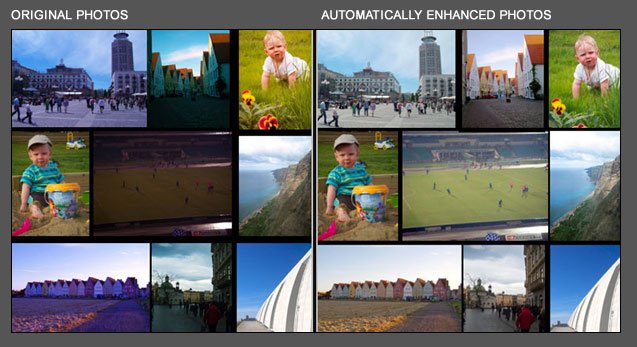
PhotoEQ simplifies working with color correction and color management. PhotoEQ's automatic color correction corrects white balance, exposure and contrast problems in single step. PhotoEQ has full support for standard ICC-profile based color management and it supports embedded profiles. PhotoEQ can convert and render between different color spaces. For example conversion from RGB to CMYK.
With PhotoEQ you can use multiple digital image and camera RAW-formats. You can save processed images to JPEG, TIFF, PNG, BMP and PSD files.
Behind our automatic solution are in-house developed spectral illumination detection algorithms. This makes it possible to teach the computer to think about colors like a human being. For you this gives an automatic and fully customizable tools to fix white balance, exposure and contrast problems in single step. Our color correction process white balance, exposure and contrast adjustments as separate layers. This gives a full control to fine tune automatic correction intensity and other color correction adjustments.
Layer based processing in PhotoEQ gives to you full freedom adjust processing results as you want. You can select which processing layers you want to use with your images.
PhotoEQ process each step as separate layer:
• Improved Image
• Color Management
• Image Filtering
• Contrast
• Exposure
• White Balance
• Image Editing
• Original Image
Features:
• PhotoEQ has a lightweight single window graphical user interface. You can just drag and drop image files or folders to the PhotoEQ and start working.
• PhotoEQ's color correction automatically corrects white balance, exposure and contrast problems in single step.
• PhotoEQ has tools and filters for resizing, cropping, rotating, straightening, sharping, de-noising and red-eye fixing.
• PhotoEQ has support for standard ICC profile based color management and it loads and saves embedded ICC profiles.
• Image Processing in PhotoEQ is non-destructive and layer based. Image editing tools can be used together with color correction or separately.
• PhotoEQ has todo queue for collecting multiple images to one by one processing or all images batch processed automatically.
• After selecting adjustments and output settings for single image these settings are used to batch process and save all images from todo queue.
• PhotoEQ reads multiple digital image and camera RAW-formats. PhotoEQ saves edited images to JPEG, TIFF, PNG, BMP and PSD formats.
• PhotoEQ can boost your Adobe Photoshop and Indesign workflows by saving original and edited images to same PSD-file as separate layers.
Whats New
https://softcolor.tumblr.com/
HOMEPAGE
https://www.softcolorsoftware.com

Download From Rapidgator
https://rapidgator.net/file/ea8ef8bcb9cc...7cbf60d55e
Download From DDownload
https://ddownload.com/dfgsnmgrrdci