
+- Biggest Warez Community (https://warezload.net)
+-- Forum: WarezLoad Downloads (https://warezload.net/Forum-WarezLoad-Downloads)
+--- Forum: Ebooks (https://warezload.net/Forum-Ebooks)
+---- Forum: English Ebooks (https://warezload.net/Forum-English-Ebooks)
+---- Thread: Cisco Asa Firewall (/Thread-Cisco-Asa-Firewall)
Cisco Asa Firewall - mitsumi - 03-30-2023
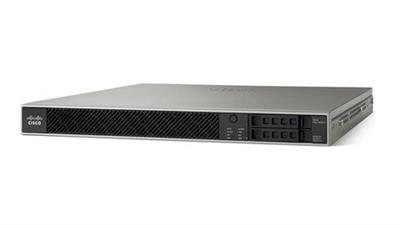
Cisco Asa Firewall
Published 3/2023
MP4 | Video: h264, 1280x720 | Audio: AAC, 44.1 KHz
Language: English | Size: 2.86 GB | Duration: 6h 6m
Everything You Need to Know About Firewall Installation
What you'll learn
Cisco ASA Traditional Firewall
Configuring cisco ASA with ASDM application
Firewall Basic
Firewall Security zones and Routing
Firewall ACLs
NAT
Firewall VPNs (SSL clientless/Anyconnect/Site-to-Site) CLI & ASDM
Requirements
Basic Networking Knowledge
Description
Cisco ASA has become one of the most widely used firewall/VPN solutions for small to medium businesses.The firewall is the barrier between a trusted and untrusted network, often used between your LAN and WAN. It's typically placed in the forwarding path so that all packets have to be checked by the firewall, where we can drop or permit them.ArchitectureThe ASA software is based on Linux. It runs a single Executable and Linkable Format program called lina. This schedules processes internally rather than using the Linux facilities. In the boot sequence a boot loader called ROMMON (ROM monitor) starts, loads a Linux kernel, which then loads the lina_monitor, which then loads lina. The ROMMON also has a command line that can be used to load or select other software images and configurations. The names of firmware files includes a version indicator, -smp means it is for a symmetrical multiprocessor (and 64 bit architecture), and different parts also indicate if 3DES or AES is supported or not.The ASA software has a similar interface to the Cisco IOS software on routers. There is a command line interface (CLI) that can be used to query operate or configure the device. In config mode the configuration statements are entered. The configuration is initially in memory as a running-config but would normally be saved to flash memory.OptionsThe 5512-X, 5515-X, 5525-X, 5545-X and 5555-X can have an extra interface card addedThe 5585-X has options for SSP. SSP stands for security services processor. These range in processing power by a factor of 10, from SSP-10 SSP-20, SSP-40 and SSP-60. The ASA 5585-X has a slot for an I/O module. This slot can be subdivided into two half width modules.On the low end models, some features are limited, and uncrippling happens with installation of a Security Plus License. This enables more VLANs, or VPN peers, and also high availability. Cisco AnyConnect is an extra licensable feature which operates IPSec or SSL tunnels to clients on PCs, iPhones or iPads.Stateful filteringFirewalls, like routers can use access-lists to check for the source and/or destination address or port numbers. Most routers however, don't spend much time at filtering.when they receive a packet, they check if it matches an entry in the access-list and if so, they permit or drop the packet. That's it.No matter if they receive a single packet or thousands, each packet is treated individually and we don't keep track of packets we have seen before or not. This is called stateless filtering.Firewalls, on the other hand, use stateful filtering. They keep track of all incoming and outgoing connections. Here are some examples:A computer on the LAN uses its email client to connect to a mail server on the Internet. The client will start the connection with a TCP three-way handshake, which the firewall sees. The firewall will keep track of this connection and when the mail server responds, the firewall will automatically permit this traffic to return to the client.A web server is sitting behind a firewall, it's a busy server that accepts an average of 20 new TCP connections per second from different IP addresses. The firewall keeps track of all connections, once it sees a source IP address that is requesting more than 10 new TCP connections per second, it will drop all traffic from this source IP address, preventing a DoS (Denial of Service).
Overview
Section 1: Introduction
Lecture 1 Introduction
Lecture 2 Basics
Lecture 3 ACLs
Section 2: Routing
Lecture 4 OSPF
Lecture 5 BGP
Lecture 6 EIGRP
Lecture 7 RIP
Lecture 8 Redistribution
Section 3: NAT
Lecture 9 NAT
Section 4: ASDM
Lecture 10 ASDM Introduction
Lecture 11 ASA configuration with ASDM
Lecture 12 OSPF config via ASDM
Lecture 13 RIP config via ASDM
Lecture 14 ACLs config via ASDM
Section 5: High avaliablity
Lecture 15 HA introduction
Lecture 16 Active standby config via CLI
Lecture 17 Active Standby via ASDM
Lecture 18 Security context HA
Lecture 19 Clustering HA
Section 6: VPNs
Lecture 20 VPNs introduction
Lecture 21 Site-to-Site VPN via CLI
Lecture 22 Site-to-Site VPN via ASDM
Lecture 23 SSL Clientless VPN via CLI
Lecture 24 SSL Clientless VPN via ASDM
Lecture 25 Anyconnect VPN via CLI
Lecture 26 Anyconnect VPN via ASDM
IT students, Anyone who wants to change the carrier
Download link
rapidgator.net:
Code:
https://rapidgator.net/file/5fc817ee6033d37d84a15106e7b4825c/jyzlf.Cisco.Asa.Firewall.part1.rar.html

https://rapidgator.net/file/2f6e00ee10c7f6f4b789cc0e856f4097/jyzlf.Cisco.Asa.Firewall.part2.rar.html

https://rapidgator.net/file/13fe026a7646889a86a97f61f1abb7f2/jyzlf.Cisco.Asa.Firewall.part3.rar.html
:
:
1dl.net:
Code:
https://1dl.net/pbrahvn866qi/jyzlf.Cisco.Asa.Firewall.part1.rar

https://1dl.net/gnbyll28lumz/jyzlf.Cisco.Asa.Firewall.part2.rar

https://1dl.net/41mwsoqz8dac/jyzlf.Cisco.Asa.Firewall.part3.rar