







10-27-2024, 11:14 AM

File Size: 532 MB
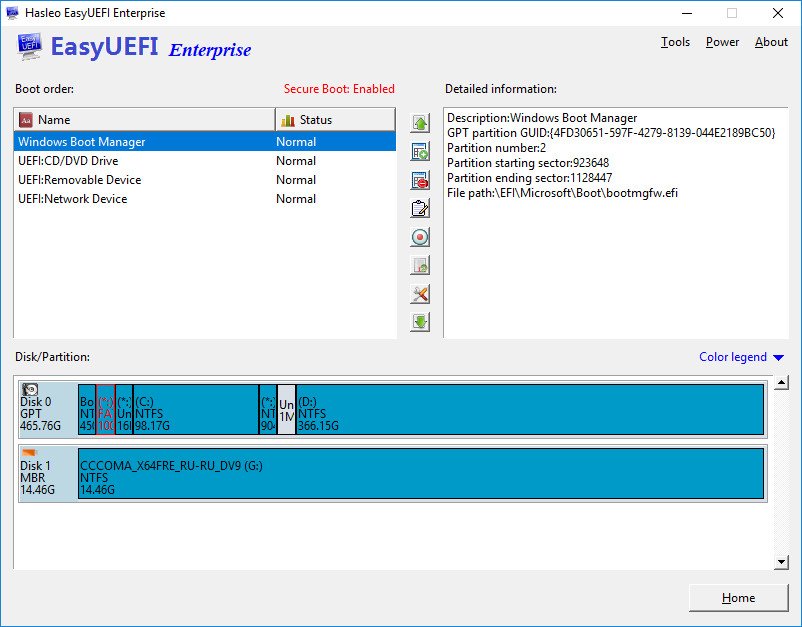
EasyUEFI owns comprehensive EFI/UEFI boot option management functions, such as create, delete, edit, clean up, backup and restore EFI/UEFI boot options, specifies an one-time boot entry for the next restart, or change EFI/UEFI boot order, all these operations done under Windows without entering BIOS setup.
Create, Delete and Modify EFI/UEFI Boot Option
Backup & Restore EFI/UEFI Boot Option
Disable & Enable EFI/UEFI Boot Option
Boot Into UEFI firmware settings (UEFI BIOS) From Inside Windows
Specifies an One-time Boot Option
Change EFI/UEFI Boot Sequence
Command line support
EFI system partition management
EasyUEFI also releases a feature which allows you to manage the EFI System Partitions, with this feature you can easily backup, restore, rebuild the EFI System Partition (ESP), or move EFI System Partition from one drive to another.
Backup EFI System Partition
Restore EFI System Partition
Recreate EFI System Partition
Move EFI System Partition to Another Drive
Manage EFI system Partitions
Create Windows PE emergency disk
With EasyUEFI you can also build a bootable Windows PE image file. After building the image file, you can use it to create a bootable USB flash drives or use 3rd-party burner software to burn it to CD/DVD. With this Windows PE emergency disk you can easily fix EFI boot issues or repair efi system partition, such as missing or corrupt EFI boot option, missing or corrupt EFI System Partition.
Screen :
What's New
Code:
https://www.easyuefi.com/change-logs.htmlHOMEPAGE
Code:
https://www.easyuefi.com/Buy Premium Account From My Download Links & Get Fastest Speed.
Code:
https://ddownload.com/k4w8ki27dt31/EasyUEFI_v5.8.0_Technician_WinPE.isoCode:
https://rapidgator.net/file/7cde8e5905c2e867ca9065ab3579a21d/EasyUEFI_v5.8.0_Technician_WinPE.iso.html Follow my Unique updates in my Website : downtopc.com